In Part 1 of this series, I covered why I finally dropped Windows 11, how I built my all-AMD Zen 5 (Ryzen 7 9700X) and RDNA 3 (ASUS TUF Gaming Radeon RX 7900 XTX) workstation inside a Fractal Design Vector RS case, how a rigid Thermalright M.2 Pro heatsink stopped my single-sided 4 TB Samsung 990 PRO from bending, why I skipped ASUS’s proprietary Q-Antenna connectors, and how I set up custom UEFI Secure Boot keys alongside TPM 2.0.
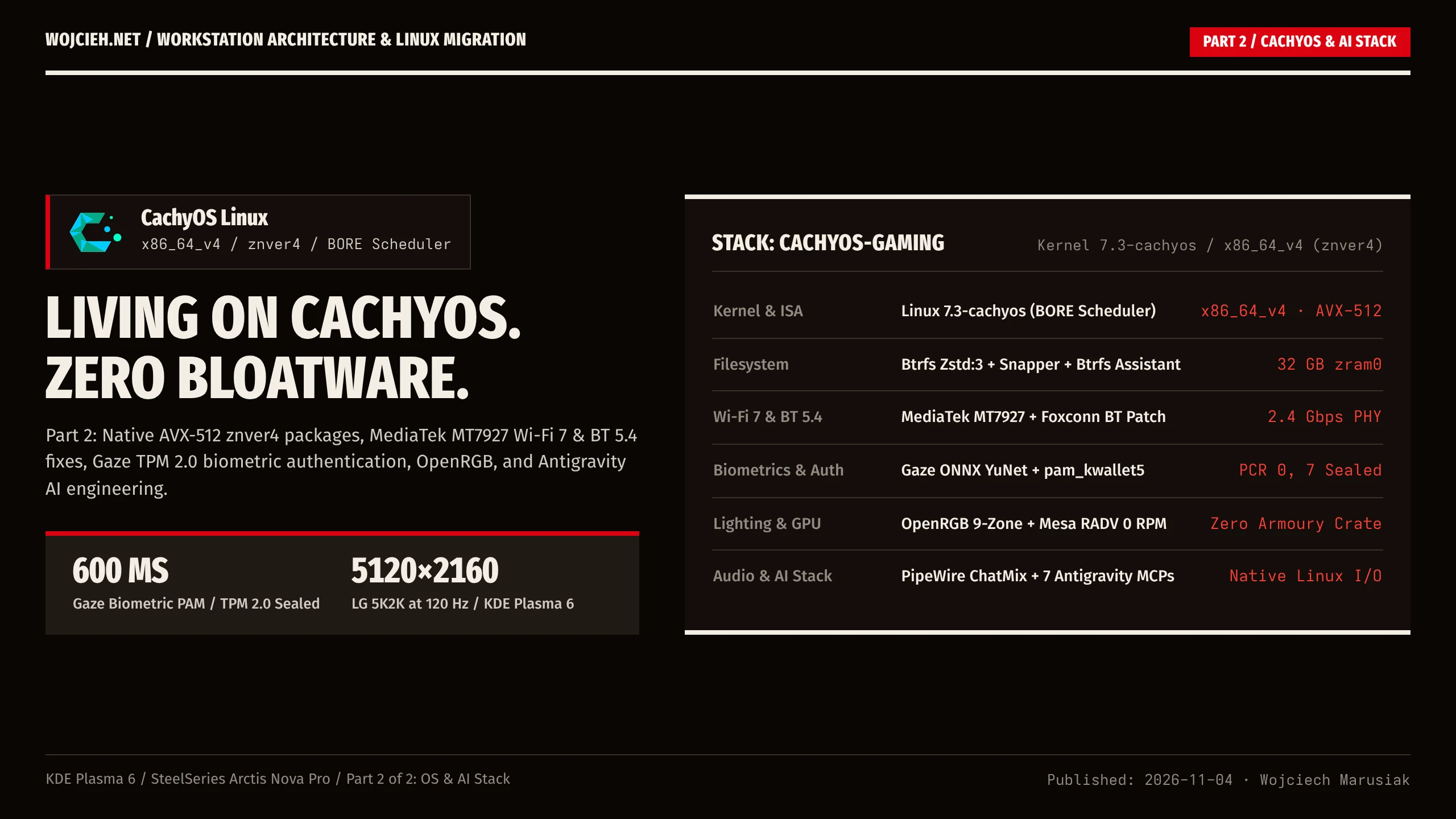
In today’s post, I will walk through the Linux operating system and daily engineering setup: why CachyOS’s znver4 repositories make a noticeable difference on Zen 5, getting the MediaTek MT7927 Wi-Fi 7 and Bluetooth 5.4 PCIe card working, recovering from an AMD fTPM CPU-swap lockout (0x000001df) in Gaze facial authentication, controlling 9 ARGB zones with OpenRGB, tuning KDE Plasma 6 on a 40-inch 5K2K ultrawide, and running my Antigravity AI + MCP homelab stack natively on Linux.
Why CachyOS? (x86_64_v4 & znver4)
When picking a Linux distribution for a Zen 5 processor, keep in mind that most mainstream distributions (Ubuntu, Fedora, vanilla Arch) still compile their binary packages for the baseline x86_64 (v1) instruction set from twenty years ago. That leaves modern instruction sets like AVX2 and 512-bit AVX-512 unused in system libraries unless you compile packages from source.
CachyOS (an Arch Linux derivative) fixes this at the repository level:
- Architecture-Optimized Repositories (
cachyos-znver4/cachyos-v4): Core system libraries (glibc,openssl,zstd), compilers (gcc,clang,rust), browsers, and desktop packages are compiled specifically for AMD Zen 4/Zen 5 (znver4) andx86_64_v4instruction sets with LTO (Link-Time Optimization) and PGO (Profile-Guided Optimization). - The
linux-cachyosKernel (7.3.x): Ships with the BORE (Burst-Oriented Response Enhancer) CPU scheduler, which keeps interactive desktop responsiveness and Wayland frame pacing smooth even when background builds or AI indexing jobs peg all 16 threads. - Btrfs + Zstd + zram by Default: Out of the box, the root (
@) and home (@home) subvolumes useBtrfswith transparentzstdcompression andnoatime, paired with Snapper + Btrfs Assistant for atomic rollbacks and a 30.5 GB compressed RAM swap device (zram0) instead of wearing out the NVMe with swap writes.
1. MediaTek MT7927 Wi-Fi 7 & Bluetooth 5.4 on Linux (TP-Link Archer TBE550E)
As I covered in Part 1, I disabled the motherboard’s onboard Realtek Wi-Fi controller to avoid ASUS’s proprietary plastic Q-Antenna plugs and installed a TP-Link Archer TBE550E PCIe card, which pairs the MediaTek MT7927 (Wi-Fi 7) and MT6639 (Bluetooth 5.4) chipset with standard brass RP-SMA connectors.
On linux-cachyos (7.2+ / 7.3+), the mt76 (mt7925e) Wi-Fi driver initialized the MT7927 PCIe controller (14c3:7927) right out of the box. Connected to my UniFi U6-Pro access point on a 160 MHz 5 GHz channel (ch 40, 5200 MHz) with WPA3-SAE, it negotiated a 2.401 Gbps TX / 2.161 Gbps RX physical link and saturated the AP’s 1 GbE uplink at 759 Mbps TCP (iperf3 -P 4) with a 2.6 ms ping to my Unraid NAS.
Bluetooth 5.4, however, failed to initialize at boot. Checking dmesg showed the missing firmware path:
|
|
Even though the PCIe card is sold by TP-Link, the internal USB Bluetooth 5.4 controller exposes a Foxconn / Hon Hai USB ID (0489:e13a) that expects MediaTek’s MT6639 RAM patch. Extracting BT_RAM_CODE_MT6639_2_1_hdr.bin, copying it into /usr/lib/firmware/mediatek/mt7927/, and reloading btusb (sudo modprobe -r btusb && sudo modprobe btusb) brought Bluetooth 5.4 (hci0) online permanently:
|
|
Tip: The small 38 MB USB thumb drive included inside the TP-Link Archer TBE550E box (
048d:1234, Integrated Technology Express) is only a read-only Windows driver ISO, not a Bluetooth receiver. Leave it in the box so it does not clutterlsblk.
2. Biometric Face Authentication (Gaze), The AMD fTPM CPU-Swap Reset (0x000001df), and USB Hub Bandwidth
To replace Windows Hello on Linux, I use Gaze (gazed.service by Gundu Labs). It runs local ONNX facial recognition (w600k_r50.onnx ArcFace + YuNet face detection + MiniFASNet anti-spoofing liveness detection) and hooks pam_gaze.so into /etc/pam.d/sudo, /etc/pam.d/polkit-1, and /etc/pam.d/kde, letting me authenticate sudo in the terminal and unlock the KDE lockscreen by looking at my Logitech BRIO 4K webcam.
The AMD fTPM CPU Swap Reset (0x000001df: integrity check failed)
The nastiest TPM surprise happened right after I swapped my hardware from the old Ryzen 7 5800X (AM4 / B550) to the new Ryzen 7 9700X (AM5 / ASUS TUF B850-PLUS).
Unlike a discrete plug-in SPI TPM 2.0 module that you can unplug from an old motherboard and move to a new one, AMD fTPM runs inside the CPU’s on-die AMD Secure Processor (ASP/PSP) and stores its non-volatile state in the motherboard’s SPI flash. The first time I powered on the new AM5 build, the BIOS stopped with the familiar prompt:
New CPU installed, fTPM/PSP NV corrupted or fTPM/PSP NV structure changed. Press Y to reset fTPM.
Pressing Y initialized a brand-new fTPM 2.0 instance with a new cryptographic Storage Root Key (SRK) and primary seed on /dev/tpmrm0. CachyOS booted fine from the Samsung 990 PRO NVMe, but my facial biometric authentication (Gaze) broke completely. Worse, every time my webcam tried to unlock the KDE lockscreen or sudo, my user account got locked out.
Gaze (gazed.service) seals its encrypted biometric key blobs in /var/lib/gaze/tpm against the hardware TPM’s primary key using the TPM2 Software Stack (tss-esapi: Esys_CreatePrimary, Esys_Load, Esys_Unseal on /dev/tpmrm0) instead of storing facial templates on disk in plaintext. Checking journalctl -u gazed.service showed the exact cryptographic error when the new Ryzen 9700X’s fTPM tried to load the blobs sealed by the old Ryzen 5800X:
|
|
Because pam_gaze.so sat at the top of /etc/pam.d/kde and /etc/pam.d/sudo, every 0x000001df TPM unseal error counted as a failed authentication attempt in PAM. After three failed wakeups, pam_faillock (deny = 3, unlock_time = 600) triggered and locked my user account out of both password and biometric login for 10 minutes.
To recover from an fTPM hardware reset on Linux, clear the old TPM-wrapped state so the daemon generates a new primary key under the new CPU’s fTPM seed:
|
|
Three Tweaks for Fast, Reliable Biometric Unlock
Getting Gaze to work reliably in daily use took three additional changes:
- Tuning
/etc/gaze/config.tomlfor Room Lighting: The default config adds a 1500 ms startup delay and setsliveness.threshold = 0.85, which is too strict for a standard RGB webcam while auto-exposure warms up. Droppingstart_delay_ms = 0,liveness.threshold = 0.70, anddark_luma_threshold = 12cut authentication time down to ~600 ms. - Relaxing
pam_faillockThresholds: By default on Arch/CachyOS,/etc/security/faillock.conflocks your user account for 10 minutes (unlock_time = 600) after 3 failed attempts (deny = 3). If you walk away from the PC or trigger the lockscreen in a dark room three times,pam_faillockblocks both password and biometric login for 10 minutes. Settingdeny = 10andunlock_time = 60in/etc/security/faillock.conffixed that. - The Unpowered USB Hub Trap: While cleaning up my desk cables, I plugged my Logitech BRIO 4K webcam into an external 4-port USB 3.0 hub (
ASMedia ASM1074). Immediately,gazestopped working andjournalctlfilled withuvcvideo 3-2.1:1.3: cannot get freq at ep 0x84 (err -110). High-bandwidth webcams like the BRIO draw up to 900 mA during sensor initialization and reserve large chunks of synchronous USB bandwidth; sharing an unpowered hub with wireless mouse and keyboard receivers causes voltage drops that hang the camera’s internal controller. Moving the BRIO back to a rear motherboard USB 3.2 port solved it right away.
3. Silencing Unused Motherboard Sensors (nct6799) & 9-Zone OpenRGB
My Fractal Vector RS case routes all chassis fans through a Nexus+ PWM fan hub connected to the motherboard’s CPU_OPT header (fan5), while the Noctua NH-D15 dual-tower cooler sits on CPU_FAN (fan2 / pwm2). On the ASUS TUF B850-PLUS, CPU_OPT mirrors the PWM duty cycle of CPU_FAN in hardware, so a single curve on pwm2 scales both the CPU cooler (725 -> 1256 RPM) and the chassis intake/exhaust fans (749 -> 1481 RPM) together. Meanwhile, the ASUS TUF Gaming Radeon RX 7900 XTX runs passively (0 RPM at 39°C core / 48°C hotspot) until a game puts load on the GPU.
To clean up sensors and CoolerControl so unused fan headers do not show 0 RPM clutter, I created /etc/sensors.d/nct6799.conf:
|
|
For lighting, OpenRGB 1.0 with the OpenRGB Effects Plugin controls all 9 zones across 6 devices (motherboard 0b05:19af, Fractal Vector RS 120-LED ARGB strip, chassis ARGB fan, G.SKILL Trident Z5 Neo RGB DDR5 RAM on /dev/i2c-14, RX 7900 XTX, TUF K7 keyboard, and Gladius III mouse) using a crimson/red Starry Night profile. Two gotchas to watch out for if your ASUS Aura lighting goes dark after a motherboard swap or BIOS update:
- Pressing
F4inside the ASUS UEFI BIOS toggles Aura into Stealth Mode, which cuts power to the onboard ARGB headers even in Linux. SetWhen system is in working state (S0)toAll Onin BIOS and do a 10-second cold PSU power cycle to reset the Aura controller’s EEPROM. - Make sure
"exit_profile"is not pointing to a blank profile in~/.config/OpenRGB/OpenRGB.json, otherwise closing the OpenRGB window will send#000000(off) to every LED in your case.
4. KDE Plasma 6 on 5K2K Wayland, PipeWire Audio, & The passwd + KWallet Gotcha
Running a 40-inch 5K2K (5120x2160 @ 120 Hz) ultrawide monitor on KDE Plasma 6 (Wayland) with 160% fractional scaling is sharp and tear-free on the open-source AMD amdgpu driver. My desktop configuration stays minimal:
- Application Style & Window Decorations:
Darkly(darkly-bin) with subtle window translucency and blur, paired withBreeze-Round-Chameleon Darkicons. - Floating Bottom Panel: A single native KDE Plasma 6 floating, auto-hiding panel centered at the bottom of the 21:9 ultrawide.
- SteelSeries Arctis Nova Pro Wireless (
ChatMixon PipeWire): Instead of SteelSeries GG bloatware,linux-arctis-manager(arctis-manager.service) talks to the USB Wireless Base Station (1038:12e0) and creates native PipeWire virtual sinks (SteelSeries Arctis Nova Pro: GameandSteelSeries Arctis Nova Pro: Chat) plus battery telemetry in the KDE system tray, so the physical ChatMix dial on the DAC works out of the box. - Instant Region Screenshots (
Printkey): On Windows, I used ShareX/Snipping Tool so hittingPrintScreenimmediately opened a crosshair region selector and copied the selection to the clipboard on mouse release. In KDE Plasma 6, you can get the exact same behavior with native Spectacle:- Set
useReleaseToCapture=trueandquitAfterSaveCopyExport=truein~/.config/spectaclerc. - Bind the
Printkey in~/.config/kglobalshortcutsrctoRectangularRegionScreenShotinstead ofLaunchSpectacle.
- Set
The passwd + KWallet Gotcha (Why Chrome Logged Me Out)
Right after I rotated my local user password in the terminal with passwd, I rebooted the PC and ran into an annoying surprise: KDE popped up a modal asking for my kdewallet password, and both Google Chrome and Antigravity logged me out of every account.
Chromium and Electron apps on KDE encrypt their login cookies in ~/.config/google-chrome/Default/Cookies using a master key (Chrome Safe Storage) stored inside KDE Wallet (~/.local/share/kwalletd/kdewallet.kwl). When you log in through SDDM, pam_kwallet5.so passes your login password to unlock kdewallet.kwl automatically.
However, if you change your Linux password via passwd in the terminal and /etc/pam.d/passwd does not notify pam_kwallet5.so, your Linux user gets the new password while kdewallet.kwl stays encrypted with your old password. On the next login, auto-unlock fails, Chrome cannot read Chrome Safe Storage, and it invalidates your encrypted session cookies.
To make sure future passwd changes re-encrypt KWallet automatically whenever you change your system password, add this line to /etc/pam.d/passwd:
|
|
5. 5K2K Gaming & AI Engineering in Daily Use
Gaming at 5120x2160 on CachyOS
With the RX 7900 XTX (24 GB VRAM) running on Mesa RADV and Proton Experimental / GE-Proton, every game I play runs natively at 5120x2160:
- Path of Exile 2: Runs via DirectX 12 (
VKD3D-Proton) in Borderless Windowed mode, which lets the Linux build ofawakened-poe-trade-binoverlay price checks cleanly on Wayland. - Beyond All Reason (BAR): Initially launched to a black screen with audio playing in the background. Checking
~/.local/state/Beyond All Reason/infolog.txtshowederror=4 (LUA_ERRMEM) not enough memorybecause the Spring engine tried to allocate a5120x2037borderless framebuffer with 4x MSAA enabled. SettingMSAA = 0andMSAALevel = 0inspringsettings.cfgfixed it right away (and at 5K2K pixel density, anti-aliasing is not needed anyway). - Battle.net via Lutris: One quirk to watch out for when installing Battle.net through Lutris/Wine: when the Battle.net login window first pops up during the Lutris installer script, do not log in yet. Close the login window with
[X]so Lutris can finish writing its Wine prefix configuration, and then launch it normally from the library.
Migrating My Antigravity AI Engineering Environment
To move my AI pair-programming setup from Windows 11 without losing context, I packaged ~/.gemini/config/ (all custom skills, rules, and MCP server definitions), my ~/DevProjects git repositories, and over 60 conversation trajectories into a migration bundle and rewrote the path references from C:\Users\wojci to /home/wojcieh.
Watch out for one detail when importing historical Antigravity sessions into ~/.gemini/antigravity/conversations/*.pb: the running Antigravity Electron app caches its conversation index (agyhub_summaries_proto.pb) in RAM and flushes it back to disk on exit. If you overwrite the .pb files while the IDE is open, closing the window will overwrite your imported index. Always run killall antigravity before importing or modifying .pb state files.
Finally, I generated dedicated CachyOS FIDO2 hardware SSH keys (ssh-keygen -t ecdsa-sk -O resident) for interactive logins (which on Linux talk directly to libfido2 without any Windows webauthn.dll Passkey Manager popup) and scoped Ed25519 automation keys for my homelab hosts (mcp-docker-host, mcp-k3s-host, pangolin, unraid, and ha), along with systemd automounts in /etc/fstab for my Unraid NFSv4.2 shares:
|
|
Summary
Moving from an AM4 Windows 11 desktop to an all-AMD Zen 5 workstation running CachyOS Linux has been a massive upgrade for my daily work. The system boots in two seconds, idles in silence with zero fans spinning on the GPU, unlocks sudo in 600 milliseconds with my face backed by a hardware TPM 2.0, and runs my entire AI agent + MCP homelab stack natively without a single Windows popup getting in the way.